
Eleventy in a Box
A premium Eleventy starter kit for designers and developers who want to spend less time setting up the same project structure and more time designing websites.
Image replacement is a topic which keeps reappearing on websites and in books. There are whole sections devoted to the pros and cons of each method in books such as Web Standards Solutions and The Zen of CSS Design.
Image replacement is a topic which keeps reappearing on websites and in books. There are whole sections devoted to the pros and cons of each method in books such as Web Standards Solutions and The Zen of CSS Design.
Personally, my preferred image replacement method is Phark as it requires no additional <span>s. But Phark is known to cause scrollbar issues in certain browsers and breaks in IE5 and of course ’breaks’ in the rare CSS on, images off scenario.
I’m working on a personal site design project which focusses purely on typography and uses no images, one font and only one colour (plus black and white). In doing this I discovered that replacing,
element { text-indent:-999em; overflow:hidden;}with
element {letter-spacing :-1000em;}had some curious black hole style effects. So I started to make some simple tests and when they worked I followed them up with an examples page.
All modern browsers seem to render my examples perfectly as expected, from headers to paragraphs to navigation lists. All the Phark Method issues are resolved (with the exception of the CSS on, images off scenario) and as I prefer to use <em> measurements rather than the px used in Phark Revisted, all seems fine and dandy. Opera chooses not to work, but is easily fixed with a simple be nice to Opera rule
, which (unfortunately) triggers a bug in Mac IE and so must be hidden from that browser.
and the only issue seems to be MacIE which correctly does not show the ’real’ text, but unfortunately renders the replaced text at only one character high. I’m still working on a fix, any suggestions? Thanks to Robert Jan Verkade for the MacIE/Opera fix.
Update: All example files now updated to include the Verkade Mac IE/Opera fix.
#1 On March 27, 2005 12:53 PM Rob Mientjes said:
Wow, works nicely. Funny how it always is a mistake at first.
I’m so using this for my redesign. Thanks, M’larkey. Scrollbars, goodbye.
#2 On March 27, 2005 03:14 PM Jeff Smith said:
Excellent tutorial Malarkey. Definitely going to keep this idea in the back of my mind for some future designs…
#3 On March 27, 2005 03:28 PM dave said:
What an interesting discovery, I found it interesting enuff to fire up ie5 for the first time in a year to see what fun and games it was up too now.
It’s the opera only rule being seen by other browsers (or not overridden) comment out overflow : hidden, and iemac likes it.
so feed iemac what it needs and forget about it forever - my initial comment was "just give iemac the text and forget about the image" so it should consider itself lucky :)
also ( maybe I just forgot how to do it properly but, in iemac with images turned off, it still displays images defined in the css….what a multifaceted browser that old bugger is.
#4 On March 27, 2005 03:31 PM pixeldiva said:
Typical… I start thinking about the fact that there must be a way to do properly accessible IR and you beat me to it :-p
Unfortunately, I’m not at a machine where I can play with this in any way, and my brain’s not entirely firing (lack of chocolate), but isn’t there a hack that lets you can feed ie5 mac specific stuff? Might be able to use that to feed it stuff which includes increased line-height or something?
Just a (half-formed, chocolate starved) thought…
#5 On March 27, 2005 04:16 PM Malarkey said:
Perhaps someone would test this MacIE fix, kindly supplied by email by Robert Jan Verkade?
/*\*/html>body .mir { letter-spacing : normal; text-indent : -999em; overflow : hidden;} /* Just for Opera */
#6 On March 27, 2005 05:09 PM dave said:
that new fix works a treat..
#7 On March 27, 2005 05:35 PM Rob Mientjes said:
Hmmm… Jeremy Keith showed me some eeriness in Safari when I had it on an anchor. Can anyone check this? (To know what to look for, the first letters of the words in the anchors were shown somewhere in the near vincinity of the replaced anchor itself. Odd stuff.)
#8 On March 27, 2005 05:55 PM Tommy Olsson said:
The CSS 2.1 spec says this about negative letter-spacing, "Values may be negative, but there may be implementation-specific limits." Sounds like it cannot be fully trusted.
I also think it’s interesting how many designers brush off the "CSS on, images off" scenario as "rare". Professionals may be on broadband, but many home users aren’t. I cannot even get broadband where I live (not even ISDN, unless I cough up ’3K), so I’m stuck with 56K.
Turning off images is not all that far-fetched when you’re on dial-up. Especially if you’re an Opera user, where it’s just one mouse click or key press away.
I think an extra SPAN element might be a small price to pay for covering this scenario, but that’s my opinion. :)
#9 On March 27, 2005 06:02 PM dave said:
Rob,
maybe ’cos of the inline display of the anchor -- you meant using: a href="anchor" class="mir" right?
#10 On March 27, 2005 06:45 PM Rob Mientjes said:
Dave, I use anchors in floated LIs, and these specific As have letter-spacing: -9999em; applied to them. Nothing inline, I’d say.
However, IE5/Mac choked on the Phark method exactly like Safari did with MIR. I dunno. Guess I’ll have to see if someone tests it.
#11 On March 27, 2005 06:51 PM Mike said:
Unfortunately, if I click on one of the replaced headers, the browser shoots up to the top of the page (as if to "follow" the negative letterspacing). This is a deal-breaker for me…
(Using Firefox 1.0/Mac)
#12 On March 27, 2005 07:21 PM Malarkey said:
@ Tommy: Ahhhh, that old images off malarkey ;) My thoughts are that I agree with you in principle, but the likelyhood of a man-on-the-street dial-up user knowing how to turn on off images in their browser, unfortunatly probably IE, is unlikely.
My Mum (a good example) has only just figured out that she can make text bigger in the browser! She thinks you must be a ’computer’ whizz to venture into File > Edit > etc. ;)
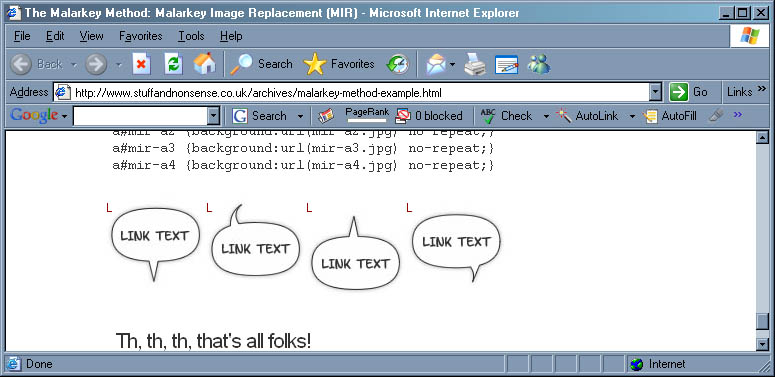
@ Mike: Are you clicking on the ’speech bubble’ links (which contain # ) or do you really mean that clicking a replaced ’header’ shoots you to the top of the page, ’cos that would be veeeerrrrry weird!
@ Everyone: I’ve updated the examples files to reflect the new MacIE/Opera fix.
#13 On March 27, 2005 07:54 PM Rob Mientjes said:
Okay, I can confirm the shooting to the top. Drag over the replaced element and see (Firefox 1.0.1/Win).
#14 On March 27, 2005 08:01 PM Andrea said:
Yes, same in Firefox 1.0.1 Mac. Clicking a replaced element causes it to happen sporadically, dragging over it always causes it :(
#15 On March 27, 2005 08:22 PM Scott said:
Rob, Andrea, you too are living in the Jurassic period. Get with the times. 1.0.2 is available, hot off the presses.
: )
#16 On March 27, 2005 08:32 PM Malarkey said:
@ Rob and Andrea: That is an odd behaviour, but my question is…
Why would you even think to drag a header?
#17 On March 27, 2005 08:35 PM Malarkey said:
My new friend Robert Jan Verkade suggests replacing the Mac IE/Opera fix with this to cure the Firefox jumping.
.mir {letter-spacing : -1000em;}
/* Be nice to Opera, but hide for Mac IE \*/
html>body .mir {letter-spacing: normal; text-indent : -999em; overflow : hidden;}
/* end of hack */Thanks Robert
#18 On March 27, 2005 10:52 PM Andrea said:
OK Scott -- I updated to 1.0.2 and the same thing happened. Firefox is not my main browser, hence the running with the dinosaurs…
Malarkey: dragging the header is a by-product of trying to select text, which is something I always do for some reason… your fix seems to have worked.
#19 On March 27, 2005 11:48 PM Alex Kadis said:
My only question is: What if the image doesn’t load? (I’m sure everyone has been to a site where an image doesn’t load) The paragraph/header element/whatever is being replaced/etc… would be entirely useless, which I’m sure everyone can agree is a bad thing. I think this is a good attempt at another image replacement, but Dave Shea’s Enhancement to Image Replacement seems to work better in this respect.
Am I wrong? If so, please tell me, I want to know! Is Shea’s better, worse, than this one? What is the best, semantic, and reasonable way to replace images?
#20 On March 28, 2005 04:12 AM timfm said:
Great stuff Andy! Title attributes seem to work fine (tested on the h1 and li) -- alt attribute didn’t show up in the li’s, however, but I think this may be the case with many of the ImgR methods.
-t
#21 On March 28, 2005 08:51 AM Paul said:
I’m getting a slight problem in IE6 (XP SP2).
The first character from the replaced text seems to be still appearing.
#22 On March 28, 2005 09:09 AM Malarkey said:
@ Paul: Funny, the first character doesn’t show on my version of WinIE6 on SP2. Is your screen-grab from my example page or a copy that you have made?
@ Tim: If ’tooltips’ are important, you could also use the title attribute. Dave Shea once said about this,
So by adding a title back to your header, you can restore these little hover effects to your site.
#23 On March 28, 2005 12:12 PM Paul said:
It’s from your example page.
All the header examples show ’T’ and the four links at the bottom show ’L’.
#24 On March 28, 2005 12:13 PM Mike said:
That was a fast fix! Nice.
All these *IR techniques seem to have some caveat or other, though…What’s wrong with an image with a TITLE attribute wrapped inside a header tag? I understand it’s a bit of a semantic no-no (but just barely). Is there some other issue I’m not aware of?
#25 On March 28, 2005 12:36 PM djn said:
’stext-indent’ for Opera? I suppose it’s a typo?
#26 On March 28, 2005 01:39 PM Cameron Adams said:
If you’re not working on a site where you have no control of the mark-up, then I reckon it’s better to go with a more mark-up, graphics-turned-off accessible approach.
Really, for an extra span the benefits far outweigh the semantic beauty that is your source code. Being on a dial-up connection myself (*gasp*) it’s not really turning images off, but trying to use a site while you’re waiting for them to load. The alt tags on table-based sites are much more helpful in that respect.
Even on a fast connection this can be pretty helpful if you know where you want to go and don’t want to wait for the pretiness to kick in.
#27 On March 28, 2005 04:13 PM steve said:
Great lil’ trick Andy, thanks.
Here’s probably a very stupid question and the answer might already be somthing like Sliding Doors, but with your new MIR used for navigation, how would you define a different image for a rollover or hover state?
thanks,
Steve
#28 On March 28, 2005 04:18 PM steve said:
nevermind, I figured it out a second later, as I thought I would…
a:hover#nav-a4 {background:url(images/nav_a4_over.jpg) no-repeat;}
duh. :)
#29 On March 28, 2005 04:54 PM hrehfeld said:
Hm, why doesnt my Opera 7.54 show any bugs? Are the simple tests already Opera fixed?
and if it works in Opera 7.54 - wouldn’t someone using Opera very likely use a relatively up-to-date version?
#30 On March 28, 2005 05:06 PM Jens Meiert said:
(The example page contains a spelling error within the style sheet sample: "stext-indent".)
#31 On March 28, 2005 05:18 PM Adam Michela said:
Great stuff Malarkey. Maybe I’ll hate on Opera a little bit less today thanks to you!
#32 On March 28, 2005 05:22 PM Mark Wiens said:
And I thought I had a pretty good solution…. Well, there’s more than one way to skin a cat.
https://markwiens.net/gab/article/13/ir-and-hiding-text-redux
What do you think, Malarkey?
#33 On March 28, 2005 06:08 PM steve said:
OK, I really like this and am going to try and use it for my work website that I have been designing. I’ve taken it pretty far and just this morning I have been able to get the navigation banged out pretty well with your MIR.
The only issues I am seeing is image flashing in IE and since I am trying to use it for a double decker navigation, firefox isn’t showing the lower level.
Feel free to see it in action, looks pretty sweet I think, and small file sizes too!
https://www.steveguberman.com has a link to what I’ve done so far. Any suggestions on perfection are greatly apreciated!
thanks,
Steve
#34 On March 28, 2005 08:22 PM Jonathan Fenocchi said:
Interesting, Malarkey, but there are a few things I disagree with.
1. The "CSS on, images off" issue is the primary reason why we use image replacement techniques, as far as I know. A normal image tag with alternate text will be almost the same as using your technique (except when CSS are off and images are on, the image will still be visible).
2. A SPAN tag is a meaningless element. Its presence makes absolutely no difference in any area of accessibility. Screen-readers ignore this tag, just as they ignore DIV. What makes it such a bad thing to add an extra SPAN tag? You can’t tell me you’re concerned with bandwidth limitations.
3. A friend of mine developed an idea for a new image replacement technique: BIR (Bob Image Replacement). I gave him a small hand, but for the most part he has come up with a way that, as far as we both know, works in all browsers. In the event that you have a link with a background (as many headers do), there is no need even for a SPAN tag. Take a look. https://wdhaven.com/article/12/bir
#35 On March 28, 2005 09:48 PM Mike said:
To fix the problem with msie 6, I found that simply adding
text-indent: -999em;
overflow: hidden;
to each of the a#mir-a css properties fixed the problems. for some reason however after applying this fix the hover properties I added ceased functioning in firefox. They work in msie and opera though.
#36 On March 29, 2005 01:24 AM Kevin Tamura said:
I truely great trick that I used today in a build. Unfortunately when I applied it to a vertical ul nav IE (win) threw a fit and left the first letter of every link in clear view. At first I thought it might be the margin but even taking that out didn’t help. I’ll try and do some studies later in the evening and see where the bug is. (I hate IE!)
#37 On March 29, 2005 03:57 AM mike said:
kevin see my comment above for the fix for the ie bug. I had the same problem with it when doing a vertical list today and that fixed it.
#38 On March 29, 2005 07:36 AM Ms. Jen said:
Lovely. It works. Thank you.
#39 On March 29, 2005 11:24 AM laacz said:
In Internet Explorer (version 6.0.2900.2180.xpsp_sp2_rtm.040803-2158) all inline within last example elements show one letter "L" in top left corner of image (screenshot).
#40 On March 29, 2005 11:26 AM laacz said:
P.S. Mike’s solution does not fix this behaviour when used with floated inline elements.
#41 On March 29, 2005 01:29 PM steve said:
Here’s another problem I’ve found (on the MAC in all browsers) when using MIR for a navigation solution, only the top half of the button is active as a link. I specified my height to be 26px and the lower half is not active.
I think there is some goodness to the use of MIR for headline tags, I put it to a pretty extensive test as a navigation system and it seems to have major faults, or I do at least.
Steve
#42 On March 29, 2005 02:52 PM mike said:
hmmm, try adding
background-position: top left;I once I get into the office in the morning and fix a few things i’ll send a link to a working example.
#43 On March 29, 2005 04:49 PM mike said:
k for a working example see www.annuitymuseum.com
#44 On March 30, 2005 11:20 AM Chris Hester said:
If a page half-loads, then images may be missing. In this case it’s vital that any technique addresses the problem of what happens when CSS is on, but images are off. (Also Opera users like myself often turn off images for fast loading.)
Anyway, I just had to say, I *adore* the images on the test page! Is there a link to more of these? The first one should be the header for this site!
#45 On March 30, 2005 03:12 PM Kate said:
Like a charm, it works. Yay!
#46 On March 30, 2005 08:03 PM mike said:
I ditched the mir for the list. it was just causing too many problems. for some reason it wasn’t showing up in firefox until i hit refresh, and then the hover effect wouldn’t work. i just switched to sIFR
#47 On March 30, 2005 08:19 PM Malarkey said:
Hi guys.
Well I never said it was a finished solution. ;) I’ll be running a few more tests over the coming days and I’ll write another column then with some detailed results. In the meantime here is what Dave has had to say on the subject today.

I’m Andy Clarke. I’ve spent over thirty years helping clients create memorable websites. I’m also the author of five books on web design.
Planning a new website? I’d love to help you create something memorable.
A premium Eleventy starter kit for designers and developers who want to spend less time setting up the same project structure and more time designing websites.
Contract Killer is plain and simple and there’s no legal jargon. It’s customisable to suit your business and has been used on countless web projects since 2008.
Free compound grid and modular grid layout generators, plus a set of HTML/CSS layout templates you can call on to make more interesting layouts, available to buy.