Eleventy in a Box
A premium Eleventy starter kit for designers and developers who want to spend less time setting up the same project structure and more time designing websites.
Day one: A skip through some of the markup and styles I used on the 2004 Disney Store UK store. One of the things that I found fascinating then about working with CSS was the application of new techniques to solve the real dilemmas which crop up during a site…
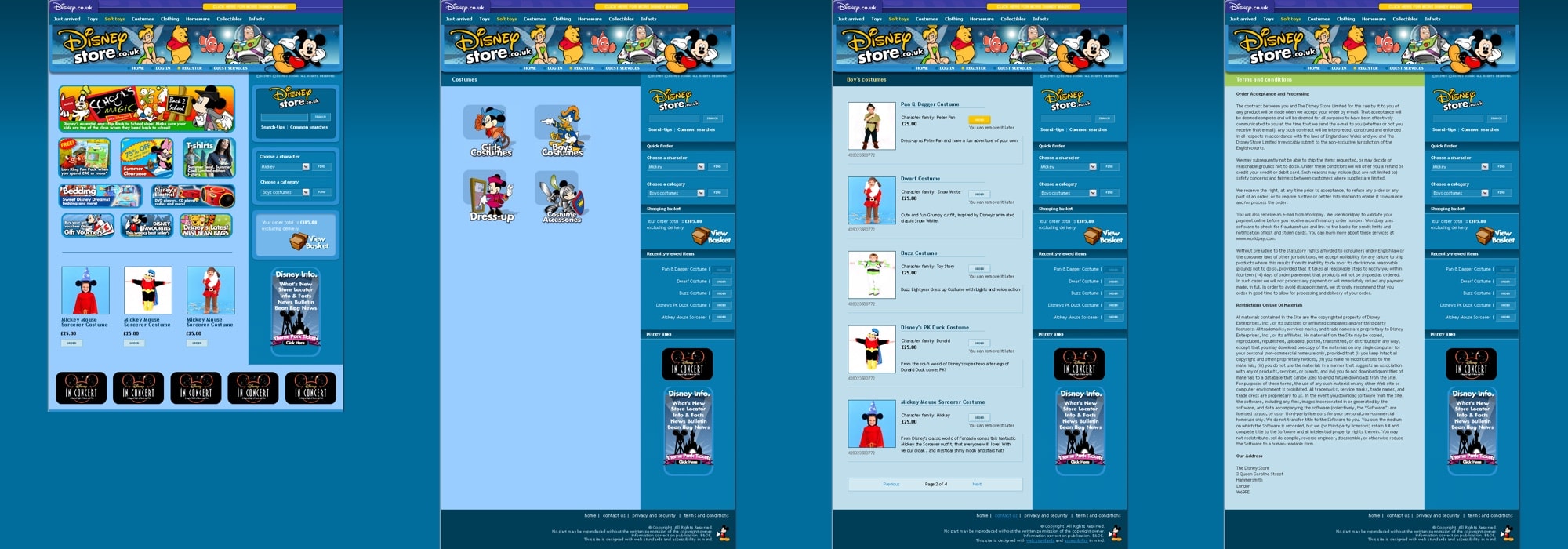

Day one: A skip through some of the markup and styles I used on the 2004 Disney Store UK store.
One of the things that I found fascinating then about working with CSS was the application of new techniques to solve the real dilemmas which crop up during a site build. On a commercial site there are different pressures than on say a personal site where the decisions that you make are your own.
But there were only rare occurrences these days where tables beat CSS, and standards-based sites need not lack the visual appeal that brands like Disney rightly demand. Understanding this, our client pushed us to find solutions that (I hope) work well. So hats off, plus links to the far cleverer than me people who dreamed up answers to the questions that this site redesign posed. Let’s look first at the home page and other components common to all pages.

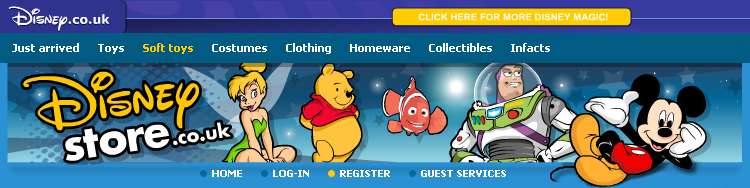
The ‘More Disney Magic’ toolbar was a Flash movie—over which we had no control—fed by a JavaScript from another server, allowing Disney world-wide to update multiple sites from a single source. For accessibility, I added a <noscript> content and a hypertext link to accommodate browsers without scripting or Flash enabled. We also wrapped the toolbar in it’s own <div> and added a title attribute to warn customers about a possible change in the ‘active’ window.
<div id="disney-corporate" title="Links to external sites" >
<script type="text/javascript" src=""></script>
<noscript>
<a href="https://www.disney.co.uk/">Disney UK</a>
</noscript>
</div>
One concern I had was the latency between the loading of the page and the arrival of the scripted content. This became particularly noticeable at peak internet usage periods. The solution was to move the <div> containing the script to near the bottom of the source order, then reposition it at the top visually with CSS.
#disney-corporate {
position : absolute;
top : 0;
}
Then the page rendered before the script was called making the page appear to load much faster. When embedding the Flash header, Drew McLellan’s Flash Satay method came to the rescue, boiling down the code and giving me back valid markup.
<object type="application/x-shockwave-flash"
data="MOVIE.SWF" width="750" height="145">
<param name="movie" value="MOVIE.SWF" />
<img src="ALTERNATIVE IMAGE" alt="ALTERNATIVE TEXT"
</object>
I also provided a static version of the branding image for people who hadn’t installed the Flash plugin.
It was interesting to learn more about how large organisations trade links between separate parts of their business. On this site, those links were found near the bottom of each page. I evaluated several different methods of inserting these links, including straight-forward image links:

In the end I plumped for a simple unordered list:
<ul id="asset-3" title="Links to external Disney sites">
<li id="a3-1"><a href="">Fun Zone</a></li>
<li id="a3-2"><a href="">Buzz</a></li>
<li id="a3-3"><a href="">Print Station</a></li>
<li id="a3-4"><a href="">Toon Town</a></li>
<li id="a3-5"><a href="">Disney Mobile</a></li>
</ul>
Styled as required using Dave Shea’s CSS Sprites.
ul#asset-3 {
position : relative;
width : 750px;
height : 75px;
padding : 0;
margin : 0;
background : url(IMAGE BACKGROUND) no-repeat left top; }ul#asset-3 li {
position : absolute;
top : 0;
padding : 0;
margin : 0; }
ul#asset-3 li, ul#asset-3 a {
display : block;
height : 75px;
padding : 0;
margin : 0;
text-indent : -3000em; }
#a3-1 {left : 0; width: 150px;}
#a3-2 {left : 150px; width: 145px;}
#a3-3 {left : 295px; width: 150px;}
#a3-4 {left : 445px; width: 148px;}
#a3-5 {left : 593px; width: 157px;}
I took exactly the same approach with the assets which dominated the centre of the home page.
We I encounter a bug and found no way to fix it. The ecommerce system output XHTML without whitespace. This was fantastic if you want to forget about IE PC’s whitespace bug, but here it broke Dave’s shiny Sprites. The lack of whitespace between list items also made IE5 Mac collapse the list, breaking the layout. My solution was to hide the list from IE5 Mac with a little CSS slight-of-hand in the form of the Commented Backslash Hack:
ul#asset-3 {
display : none; }
/* Commented Backslash Hack
hides rule from IE5-Mac */
ul#asset-3 {display : block;}
/* End IE5-Mac hack */
Next I’ll run through the accessibility decisions I made:
#1 On October 5, 2004 05:11 PM John Oxton said:
I love the thinking behind the ’More Disney Magic’ toolbar, one for the notebook! Looking foward to more! :)
#2 On October 5, 2004 05:45 PM Chris Moritz said:
I seem to remember that there were reported problems with the Satay method on certain machines running IE 5.5. Did you see any problems in QA with it?
#3 On October 5, 2004 05:58 PM Malarkey said:
@ Chris: Hi. Good point, and yes you are correct about certain possible Satay issues. To quote from Still Dreamer’s article,
"it was realised that some versions of Internet Explorer 5.5 had corrupted Flash players installed and displayed a text box instead of a Flash movie."
Their solution relies on scripting, which is not a route that we wanted to take at the outset. Therefore the plan is to take a pragmatic approach and monitor the percentage of IE5 users before we commit to anything.
#4 On October 5, 2004 06:29 PM Neil said:
Great stuff Malarkey, thanks for sharing man:)
#5 On October 5, 2004 09:53 PM brooks said:
Oddly enough, I’m sitting at Disney on a wireless connection reading this entry.
Excellent work!
#6 On October 6, 2004 12:31 PM cgriego said:
In regards to the Disney toolbar and load times, the script tag offers a defer="defer" attribute that delays the script loading and executing until the page is rendered. Did you try this method? If so, where there any issues with it that made the css repositioning a better solution?
#7 On October 6, 2004 08:34 PM Aleksandar said:
Congratulations on excellent Disney redesign as well as this redesign here - much nicer colour scheme, at least to my eyes.
About the Flash Satay….I used it often in my works and thought it is the best there is. However, a friend of mine, running IE5.5 with all SPs there are on Win98, simply could not see any Flash. I tried with the very same install in VMWare only to see that all works properly. He reinstalled complete Windows, and yet it did not work.
Something was blocking the Flash, and even worse - it seems that IE did not realized that there is a Flash 7 installed - it went to download the ActiveX each time he accessed the page.So in utter dispair, I tried Ian Hickson’s code - and it worked. You might try it if problems appear.
#8 On October 7, 2004 04:13 PM Andy Budd said:
It seems like you’ve used an awful lot of image replacement on the site. I’d be interested to know why you’ve handled images this way rather than having them embedded in the page
#9 On October 7, 2004 09:13 PM Malarkey said:
@ Mr. Budd: That’s an interesting question. It was a choice between Phark iFR and
<img src="" alt="WHAT THE IMAGE TEXT SAYS" />We plumped for iFR because my own view is that there is a fundamental difference between an image which ’should’ be in the source (eg: a product photo) and an image that is there to replace semantic text.
As the headers should be headers, iFR seemed the logical choice, although we will soon be experimenting with Flash replacement which seems more robust still.
@ Aleksandar: Thanks for the Hickson link. We will be trying that out on the next revision.
#10 On October 7, 2004 09:53 PM S said:
Hi ,
I have Windows XP with SP 2 and IE 6 running. I also have Macromedia Flash MX installed on my machine. But still I am not able to view the flash movie on the site.
What could be the problem?
#11 On October 9, 2004 03:37 AM cgriego said:
S, do you have ActiveX controls disabled? The Flash plugin for IE is an ActiveX control.

I’m Andy Clarke. I’ve spent over thirty years helping clients create memorable websites. I’m also the author of five books on web design.
Planning a new website? I’d love to help you create something memorable.
A premium Eleventy starter kit for designers and developers who want to spend less time setting up the same project structure and more time designing websites.
Contract Killer is plain and simple and there’s no legal jargon. It’s customisable to suit your business and has been used on countless web projects since 2008.
Free compound grid and modular grid layout generators, plus a set of HTML/CSS layout templates you can call on to make more interesting layouts, available to buy.